

TK8 Deposit Guide for MYR Payment Methods and Deposit Steps
Table of Contents
TK8 Deposit Overview
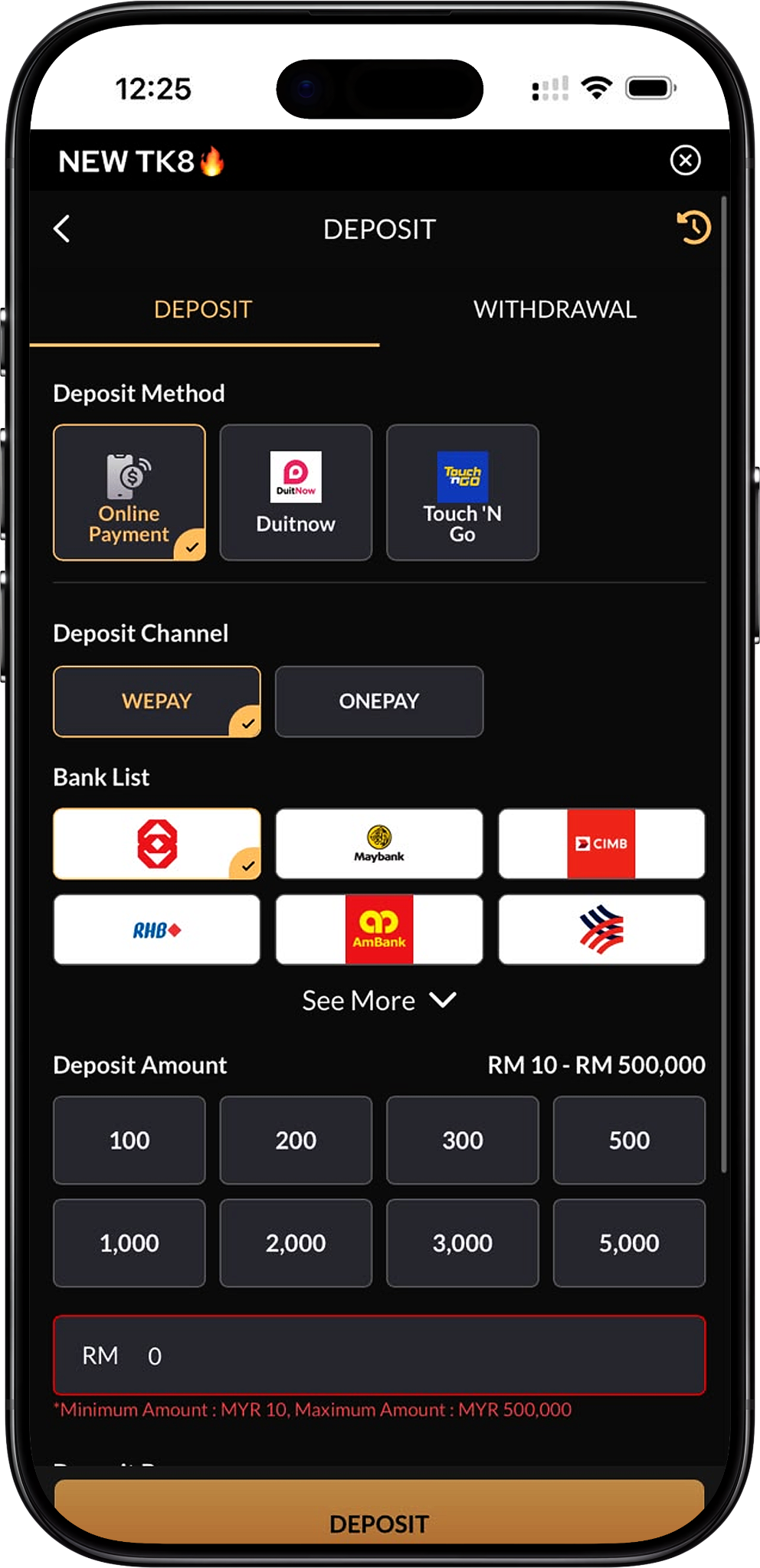
Deposit Funds in MYR
TK8 provides MYR deposit options through the member deposit interface. Members can select an available payment method, choose the corresponding payment channel or bank, enter an amount within the displayed limits, select a promotion preference where available, and submit the transaction.
Deposit Options Depend on the Selected Payment Route
The payment interface shows different channels, banks and transaction limits depending on the method selected. Members should rely on the information displayed on the deposit screen at the time of payment because availability and limits can differ between Online Payment, DuitNow and Touch ’N Go.
Available Deposit Methods
Online Payment
Online Payment provides access to supported payment channels and participating Malaysian banks. The supplied interface shows WEPAY and ONEPAY as available channel examples, with bank options including Maybank, CIMB, RHB, AmBank, BSN and other supported institutions depending on the selected channel.
DuitNow
DuitNow is available as a dedicated deposit method. After selecting DuitNow, members choose an available processing channel and the bank or payment route presented by the system before entering the required MYR amount.
Touch ’N Go
Touch ’N Go is also displayed as a deposit method. The supplied interface shows a dedicated XXXPAY channel for this route, after which the member selects the available Touch ’N Go payment option and enters the deposit amount.
Payment Availability Can Change
A method, channel or bank shown for one transaction may not appear for another. Members should use the current deposit interface as the authoritative source instead of assuming that every payment option will always remain available.
Deposit Channels and Supported Banks
WEPAY
WEPAY appears as one of the processing channels available for selected deposit methods. After choosing it, members can select one of the participating banks displayed by the platform and continue with the payment instructions.
ONEPAY
ONEPAY is another displayed payment channel. The available bank list can differ from WEPAY, so members should compare the options presented after selecting the channel before proceeding.
XXXPAY
XXXPAY appears in the supplied interface when Touch ’N Go is selected. It provides the corresponding payment route for completing the transaction through the displayed Touch ’N Go option.
Participating Malaysian Banks
The supplied deposit screens show participating institutions such as Maybank, CIMB, RHB, AmBank and BSN, alongside additional bank options that may be accessible through the “See More” control. The exact bank list depends on the selected payment method and channel.
TK8 Deposit Limits
Minimum Deposit
The supplied payment screens show a minimum deposit amount of MYR 10. Members should still confirm the minimum shown for their selected method before submitting a transaction.
Maximum Deposit for Selected Routes
Some Online Payment and Touch ’N Go routes display a maximum transaction amount of MYR 500,000, giving a displayed range of MYR 10 to MYR 500,000.
Maximum Deposit for Other Routes
Other payment configurations shown in the supplied interface display a maximum amount of MYR 30,000, giving a displayed range of MYR 10 to MYR 30,000.
Preset Deposit Amounts
Depending on the selected route, the interface provides preset values such as RM50, RM100, RM200, RM300, RM500, RM1,000, RM2,000, RM3,000, RM5,000 and RM10,000. Members can also use the amount field where permitted.
Always Follow the Current On-Screen Limit
Because different channels display different maximums, members should not assume one universal transaction ceiling. The minimum and maximum figures shown beside the selected payment option should be checked before entering an amount.
TK8 Deposit Steps
Step 1. Sign In to Your Account
Start with TK8 Login and access the registered account that you want to fund. New members should complete TK8 Register before attempting a deposit.
Step 2. Open the Deposit Page
From the member account, select TK8 Deposit to open the funding interface. Review the available payment methods before choosing one.
Step 3. Choose a Deposit Method
Select Online Payment, DuitNow or Touch ’N Go according to the payment option you want to use. The next available channels and banks will depend on this selection.
Step 4. Select the Payment Channel
If the selected method requires a processor, choose the available channel such as WEPAY, ONEPAY or XXXPAY. Check the highlighted selection before continuing because each channel can present a different bank list or transaction limit.
Step 5. Select a Bank or Payment Option
Choose the bank or payment route displayed beneath the selected channel. Where additional institutions are available, use the “See More” option to review the expanded list before making your selection.
Step 6. Enter the Deposit Amount
Select one of the preset MYR amounts or enter an allowed amount manually. Confirm that the figure is no lower than the displayed MYR 10 minimum and does not exceed the maximum shown for the selected route.
Step 7. Choose a Deposit Bonus Preference
If an eligible promotion is displayed, choose the bonus you want before submitting the deposit. Members who do not want a bonus can select the “Do not participate in any promotions” option. Review TK8 Promotion first if you want to compare the available offers and their conditions.
Step 8. Review the Deposit Details
Confirm the payment method, processing channel, selected bank or wallet, amount and promotion choice. Correct any mismatch before continuing because these settings determine how the payment will be processed.
Step 9. Submit the Deposit
Select the Deposit button and follow the payment instructions presented by the selected provider. Complete the payment using the corresponding bank, DuitNow or Touch ’N Go flow without changing the instructed transaction details.
Step 10. Check Your Updated Balance
Return to the member account after payment processing and verify that the wallet reflects the completed transaction. If necessary, use the transaction or deposit history function to confirm its status before starting any game activity.
Deposit Bonus Options
Slots 100% Welcome Bonus RM 800*
The deposit interface shows SLOTS 100% WELCOME BONUS RM 800* (/en/promotion/slots-100-welcome-bonus-rm800, Internal Link) as an optional welcome promotion. The supplied screen indicates that this option becomes available from a qualifying deposit above RM30. Members should read the dedicated promotion conditions before selecting it.
Live Casino 50% Welcome Bonus RM 300*
The interface also displays LIVE CASINO 50% WELCOME BONUS RM 300* (/en/promotion/live-casino-50-welcome-bonus-rm300, Internal Link). The supplied screen indicates a qualifying deposit above RM50, subject to the promotion’s separate bonus limit, turnover requirement and eligibility rules.
Deposit without a Bonus
Members who prefer not to attach a promotion can select “Do not participate in any promotions.” This keeps the transaction separate from the displayed welcome bonus options, although standard account and payment rules still apply.
Check Bonus Conditions before Depositing
A bonus can introduce eligibility, turnover, product or withdrawal conditions. Review the relevant promotion details before confirming the deposit rather than choosing an offer based only on the headline percentage or maximum bonus.
Choosing the Right Deposit Method
Compare Available Limits
If the intended transaction exceeds MYR 30,000, check whether another available route currently displays a higher maximum such as MYR 500,000. Never split or restructure payments merely to bypass a payment provider’s restrictions.
Use a Payment Account You Control
Deposit using a supported payment account associated with the member where required by platform rules. This can reduce verification issues and make transaction review easier if a payment requires follow-up.
Check the Processing Channel before Payment
When WEPAY, ONEPAY or another channel is presented, confirm that the selected bank is supported by that specific processor. Changing the channel can also change the available bank list and permitted transaction range.
Choose Promotions Deliberately
If a deposit is intended for a particular promotion, verify the qualifying amount and applicable game category first. Members can compare welcome offers, rebates, reload bonuses and VIP benefits through TK8 Promotion.
Checking Your Deposit
Review the Account Balance
After a successful transaction, verify the updated MYR balance before using the funds. Do not submit an immediate duplicate deposit simply because the first transaction takes time to reflect.
Check Deposit or Transaction History
The history control shown in the deposit interface can be used to review earlier payment activity. Checking the recorded transaction status helps distinguish a pending payment from one that has already been completed.
Verify a Promotion Credit Separately
If a bonus was selected, check both the deposited amount and any applicable promotional credit. A bonus may follow separate activation or turnover conditions even when the underlying deposit has already been completed.
Plan Withdrawals after Reviewing Conditions
Before moving deposited or promotional funds out of the account, review TK8 Withdrawal and any applicable promotion conditions so that turnover or account requirements are understood in advance.
Deposit Safety and Account Checks
Confirm the Selected Payment Details
Verify the method, channel, bank or wallet and amount before authorising payment. A wrong selection can delay processing or require additional verification.
Do Not Share Login or Verification Credentials
Banking passwords, one-time verification codes and other private authentication information should only be entered through the relevant trusted payment process and should never be shared with another person.
Check Platform Rules
Review Terms and Conditions and Privacy Policy for information about account requirements, transaction handling and personal data.
Keep Deposit Amounts within Personal Limits
Deposit only an amount that fits your intended entertainment budget. Members can consult Responsible Gaming for information about maintaining limits and managing gaming activity responsibly.
TK8 Deposit FAQs
What deposit methods are available?
The supplied interface shows Online Payment, DuitNow and Touch ’N Go as available deposit methods. The exact options displayed to a member can vary.
What payment channels are shown?
WEPAY and ONEPAY appear under selected online payment configurations, while XXXPAY is shown for the supplied Touch ’N Go route.
What is the minimum deposit?
The supplied deposit screens display a minimum amount of MYR 10. Always confirm the current limit shown for the selected payment method before proceeding.
What is the maximum deposit?
The maximum differs by payment route. The supplied screens show limits of either MYR 30,000 or MYR 500,000 depending on the selected method and processing channel.
Which banks can I use?
Available bank options shown in the supplied material include Maybank, CIMB, RHB, AmBank and BSN, together with additional participating institutions. The bank list can change according to the selected channel.
Can I deposit with DuitNow?
Yes. DuitNow appears as a dedicated deposit method in the supplied interface and can be selected before choosing the corresponding processing channel and payment option.
Can I use Touch ’N Go?
Yes. Touch ’N Go appears as a supported deposit method, with XXXPAY shown as the corresponding channel in the supplied interface.
Can I deposit without claiming a bonus?
Yes. Select “Do not participate in any promotions” when the deposit screen offers this choice.
Which welcome bonuses can appear during deposit?
The supplied interface displays the Slots 100% Welcome Bonus RM 800* and Live Casino 50% Welcome Bonus RM 300* as deposit-linked options when their qualifying requirements are met.
Is a deposit the same as a bonus?
No. A deposit is the member’s payment into the account, while a bonus is a separate promotional benefit that may carry eligibility and turnover requirements.
Where can I review rebate benefits after depositing?
Visit TK8 Rebate to review daily Slots and Live Casino rebate structures separately from deposit-based promotions.
Where can deposited funds be used?
Members can review TK8 Games, including Slot, Live Casino, Sports, Fishing, Card Game, Esports, Cockfight and Instant Win.
Can I check lottery products after depositing?
Members interested in number-based products can visit TK8 Lottery to review the available lottery information, draw types and related guidance.
Where can I find general account help?
Visit TK8 FAQs for common account questions, or return to TK8 Home to navigate other account services.
What is the direct platform address?
The platform can also be accessed through the naked URL https://tk8official.my.
Make a TK8 Deposit
Sign in, choose an available MYR payment method, confirm the current transaction limits and promotion preference, then review all payment details before submitting your deposit.