

TK8 Withdrawal Guide for MYR Bank Withdrawals
Table of Contents
- 1. TK8 Withdrawal Overview
- 2. Main Wallet and Available Amount
- 3. Bank Account Requirements
- 4. Withdrawal Turnover Requirements
- 5. TK8 Withdrawal Steps
- 6. Withdrawal Limits and Amount Checks
- 7. Checking a Withdrawal Request
- 8. Common Withdrawal Issues
- 9. Withdrawal Safety and Account Checks
- 10. TK8 Withdrawal FAQs
TK8 Withdrawal Overview
Withdraw Available MYR Funds to a Bank Account
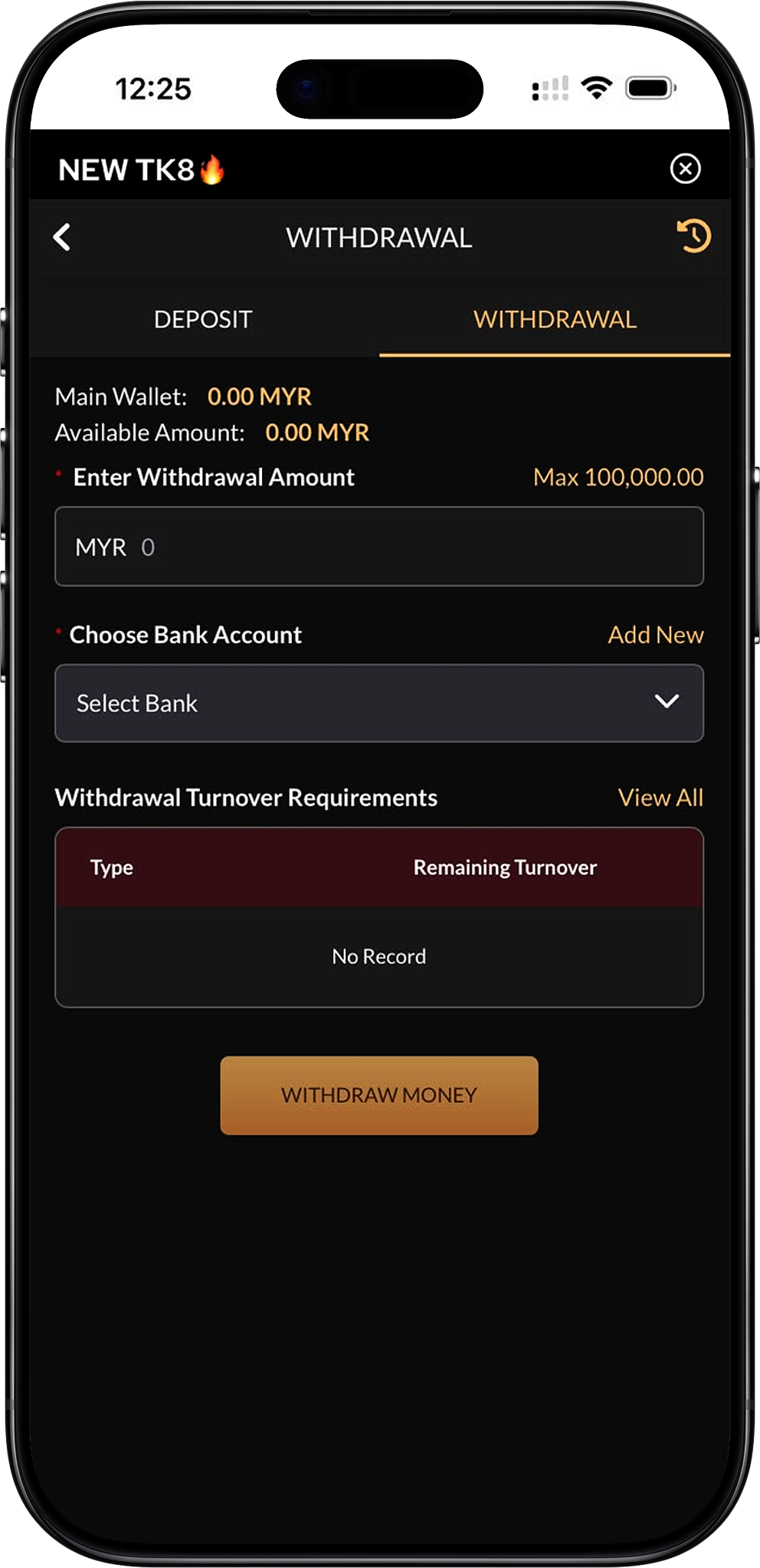
TK8 provides a withdrawal interface where members can review their Main Wallet, check the Available Amount, enter a withdrawal figure, select a registered bank account and review any remaining turnover requirements before submitting a request.
Review the Withdrawal Screen before Submitting
The supplied interface shows the wallet balance and available withdrawal balance separately. Members should confirm both figures, the selected bank account and the turnover section before proceeding with a withdrawal.
Main Wallet and Available Amount
Main Wallet Balance
The Main Wallet figure represents the balance currently shown in the member wallet. A wallet balance does not necessarily mean the entire amount is immediately available for withdrawal because eligibility can depend on turnover requirements and other account conditions.
Available Amount
The Available Amount indicates the amount currently shown as eligible for withdrawal through the interface. Members should use this figure together with the displayed maximum limit when deciding how much to request.
Why the Two Amounts Can Differ
The Main Wallet and Available Amount may differ when funds are subject to unsettled activity, turnover requirements, promotion conditions or other transaction rules. Review the withdrawal requirement section before assuming the full wallet balance can be withdrawn.
Bank Account Requirements
Select a Registered Bank Account
The withdrawal screen requires members to choose a bank account before submitting a request. Use the “Select Bank” field to choose an existing registered account associated with the member profile.
Add a New Bank Account
If the required bank account is not already available, use the “Add New” option shown beside the bank selection field. Enter the requested bank details accurately and verify them before saving.
Check Account Holder Information
Where platform verification rules apply, the withdrawal bank account should match the member information associated with the account. Using inconsistent details can lead to additional review or processing delays.
Withdrawal Turnover Requirements
Review Remaining Turnover before Withdrawal
The withdrawal interface includes a “Withdrawal Turnover Requirements” section with Type and Remaining Turnover columns. Members should review this area before submitting a withdrawal to see whether any qualifying activity is still outstanding.
No Record Means No Requirement Is Displayed
The supplied image shows “No Record” under the turnover section. This means no remaining turnover requirement is displayed in that example. Members should still rely on their own live account screen because promotion or account conditions can differ.
Promotion Turnover Can Affect Withdrawals
Welcome bonuses, reload bonuses and other offers may include turnover conditions. Review TK8 Promotion and the specific promotion terms connected to your account before requesting a withdrawal.
Rebate Turnover May Also Apply
Some rebate benefits can require additional turnover before funds are transferred or withdrawn. Check TK8 Rebate when a rebate has recently been credited to your wallet.
TK8 Withdrawal Steps
Step 1. Sign In to Your Account
Start with TK8 Login and access the account from which you want to withdraw funds. The withdrawal request must be submitted from the relevant member account.
Step 2. Open the Withdrawal Page
Navigate to TK8 Withdrawal from the member interface. The page will display the Main Wallet, Available Amount, withdrawal amount field, bank account selector and turnover requirement section.
Step 3. Check the Main Wallet and Available Amount
Compare the wallet balance with the amount currently available for withdrawal. If the Available Amount is lower than the Main Wallet, review any account or turnover conditions before continuing.
Step 4. Review Withdrawal Turnover Requirements
Check the “Withdrawal Turnover Requirements” section and use “View All” if additional records are available. Complete any outstanding requirement shown there before attempting to withdraw the affected funds.
Step 5. Enter the Withdrawal Amount
Enter the MYR amount you want to withdraw. The supplied interface shows a maximum of MYR 100,000 for the withdrawal screen, so the requested amount should remain within both the Available Amount and the displayed transaction limit.
Step 6. Select Your Bank Account
Open the bank selector and choose the bank account that should receive the funds. Confirm the account carefully before continuing because the withdrawal will be associated with that selected destination.
Step 7. Add a Bank Account if Required
If no suitable bank account is saved, select “Add New” and provide the requested banking information. Review the details before saving and returning to the withdrawal form.
Step 8. Review the Request
Verify the withdrawal amount, selected bank account, available balance and turnover status. Correct any mismatch before submitting the request.
Step 9. Select Withdraw Money
When all details are correct, press the “Withdraw Money” button to submit the withdrawal request. Follow any additional verification or confirmation instructions presented by the system.
Step 10. Check the Withdrawal Status
After submitting the request, review the transaction or withdrawal history where available. Avoid sending duplicate requests while an existing withdrawal is still being processed.
Withdrawal Limits and Amount Checks
Displayed Maximum Withdrawal
The supplied withdrawal interface shows “Max 100,000.00,” indicating a displayed maximum withdrawal amount of MYR 100,000 for the shown screen. Members should always confirm the current live limit before submitting a request.
Available Balance Still Applies
A displayed maximum does not mean every member can withdraw that full amount. The request must also remain within the Available Amount shown in the member account.
Turnover Conditions Can Reduce Immediate Availability
If qualifying turnover remains incomplete, some funds may not yet be available for withdrawal even when they appear in the Main Wallet. Complete the required activity and check the withdrawal screen again afterward.
Checking a Withdrawal Request
Review Withdrawal History
Use the account transaction or withdrawal history to confirm whether a submitted request is pending, completed, rejected or otherwise updated. This is more reliable than submitting another request without checking the first one.
Confirm the Bank Destination
Verify that the selected receiving bank account is correct after submission where the history interface displays that information. If account details appear incorrect, use the available support channel rather than creating repeated withdrawal requests.
Check Updated Wallet Balances
After a withdrawal is accepted or completed, compare the Main Wallet and Available Amount with the transaction record. Keeping these figures consistent helps identify whether the request has been processed.
Common Withdrawal Issues
Available Amount Is Zero
If the Available Amount is zero, review wallet status, settlement activity and any turnover requirements. A positive Main Wallet balance alone does not guarantee that funds are presently withdrawable.
Bank Account Is Not Available
If the required bank account does not appear in the selector, use the “Add New” function to register it. Make sure the banking information is entered correctly before submitting any withdrawal.
Remaining Turnover Is Displayed
When a turnover record appears, review the Type and Remaining Turnover values and complete the requirement before attempting to withdraw the affected balance. Promotion-specific rules can be checked through TK8 Promotion.
Withdrawal Request Is Still Pending
Processing can require time depending on account review and banking conditions. Check the withdrawal history before taking further action and avoid creating unnecessary duplicate requests.
Deposit or Bonus Conditions Are Unclear
Review TK8 Deposit and the applicable promotion page to understand whether a deposit bonus or related turnover condition may be affecting withdrawal eligibility.
Withdrawal Safety and Account Checks
Verify Bank Details before Submission
Carefully check the bank account selected for the withdrawal. Incorrect destination information can cause processing problems and may require additional account verification.
Keep Account Credentials Private
Do not share login credentials, passwords, verification codes or banking authentication information with another person. Use only the account and banking interfaces required for the transaction.
Review Platform Policies
Read Terms and Conditions and Privacy Policy for information about account use, transactions and personal data handling.
Review Responsible Gaming Information
Withdrawals are part of overall account management. Members can consult Responsible Gaming for guidance on maintaining personal limits and managing gaming activity responsibly.
TK8 Withdrawal FAQs
How do I withdraw money?
Sign in, open the withdrawal page, check your Available Amount and turnover status, enter the withdrawal amount, choose a registered bank account and select “Withdraw Money.”
What is the maximum withdrawal amount?
The supplied interface shows a maximum of MYR 100,000. The live account screen should be checked each time because transaction limits can change.
What is the difference between Main Wallet and Available Amount?
Main Wallet shows the wallet balance, while Available Amount shows the balance currently displayed as eligible for withdrawal. The two values may differ when conditions remain outstanding.
Do I need a bank account to withdraw?
Yes. The supplied interface requires the member to select a bank account before submitting a withdrawal request.
Can I add a new bank account?
Yes. The withdrawal screen includes an “Add New” option beside the bank account section for registering another withdrawal destination.
What are withdrawal turnover requirements?
They are conditions that may need to be completed before certain funds become withdrawable. The withdrawal page displays the relevant Type and Remaining Turnover when a record applies.
What does “No Record” mean under turnover requirements?
It means no turnover requirement is displayed in that section for the account state shown. It does not guarantee that every future withdrawal will have no conditions.
Can a welcome bonus affect withdrawal?
Yes. Bonus offers may include turnover requirements or other conditions. Review SLOTS 100% WELCOME BONUS RM 800* (/en/promotion/slots-100-welcome-bonus-rm800, Internal Link) or LIVE CASINO 50% WELCOME BONUS RM 300* (/en/promotion/live-casino-50-welcome-bonus-rm300, Internal Link) if either offer was selected during deposit.
Can a reload bonus affect withdrawal?
Yes. Members who use the 10% UNLIMITED RELOAD BONUS RM200 should check its qualifying turnover conditions before withdrawing associated funds.
Can rebates affect withdrawal eligibility?
Rebate credits can be subject to their own conditions. Review 0.5% REBATE SLOTS, 1.0% REBATE LIVE CASINO and the general TK8 Rebate page for the applicable details.
Where can I check other account services?
Members can return to TK8 Home, review TK8 Games, check TK8 VIP, or visit TK8 FAQs for other account information.
What is the direct platform address?
The platform can also be accessed through the naked URL https://tk8official.my.
Request a TK8 Withdrawal
Sign in, review your available balance and turnover requirements, select the correct bank account and confirm the withdrawal amount before submitting the request.